
loading

TIPTOP Light- Professional Stage Light Manufacturer Offers Complete Solution Since 2012

SL04 DMX Console Stage Light Controller For sweetlight Grandma Magic Q Chromateq DMXCreator ArtNet lumidesk 1
SL04 DMX Console Stage Light Controller For sweetlight Grandma Magic Q Chromateq DMXCreator ArtNet lumidesk 2
SL04 DMX Console Stage Light Controller For sweetlight Grandma Magic Q Chromateq DMXCreator ArtNet lumidesk 3
SL04 DMX Console Stage Light Controller For sweetlight Grandma Magic Q Chromateq DMXCreator ArtNet lumidesk 4
SL04 DMX Console Stage Light Controller For sweetlight Grandma Magic Q Chromateq DMXCreator ArtNet lumidesk 5
SL04 DMX Console Stage Light Controller For sweetlight Grandma Magic Q Chromateq DMXCreator ArtNet lumidesk 6
SL04 DMX Console Stage Light Controller For sweetlight Grandma Magic Q Chromateq DMXCreator ArtNet lumidesk 1
SL04 DMX Console Stage Light Controller For sweetlight Grandma Magic Q Chromateq DMXCreator ArtNet lumidesk 2
SL04 DMX Console Stage Light Controller For sweetlight Grandma Magic Q Chromateq DMXCreator ArtNet lumidesk 3
SL04 DMX Console Stage Light Controller For sweetlight Grandma Magic Q Chromateq DMXCreator ArtNet lumidesk 4
SL04 DMX Console Stage Light Controller For sweetlight Grandma Magic Q Chromateq DMXCreator ArtNet lumidesk 5
SL04 DMX Console Stage Light Controller For sweetlight Grandma Magic Q Chromateq DMXCreator ArtNet lumidesk 6

SL04 DMX Console Stage Light Controller For sweetlight Grandma Magic Q Chromateq DMXCreator ArtNet lumidesk

This device is not an ordinary Artnet network box, but rather an exceptionally powerful piece of dmx stage equipment. It supports lighting network protocols including Artnet, sACN,MA2-NET, and natively supports MA2 software (no cracking required; simply download MA2 onPC from the official site for direct use, identical to genuine hardware). It supports RDM protocol, offline capture, playback, and recall functions, DMX input, DMX input → Artnet conversion for transmission to 3D or control software, DMX universe cloning, interception, and routing, DMX512 system diagnostics (can function as a DMX512 detector), incorporates 54 built-in RGB/RGBW effects (supports external recall), and accommodates HTTP/UDP/web/DMX input-output/RS485/RS232 recall to fulfil comprehensive centralised control system requirements.
Note: RS232 recall necessitates an additional level conversion module costing a few dollars. Important: RS232 cannot be directly connected. RS232 operates at +13V/-13V levels, whereas the box interface uses 5V levels.
Crucially: No additional software installation is required. All functionality is built into the box. Simply access the box's IP address via a web browser and open its web-based application to use it. This delivers genuine simplicity, hassle-free operation, immediate usability, and cross-platform compatibility.
This USB dmx controller is compatible with numerous professional lighting software packages, most of which are fully functional and operational versions.
5.0
Brand:
TIPTOP
Origin:
Guangzhou
Product Type:
Stage Effect
Imported:
No
Custom Processing:
Yes
design customization

    oops...!

    no product data.

    Go to homepage

    Product advantages

    SL04 DMX Console Stage Light Controller For sweetlight Grandma Magic Q Chromateq DMXCreator ArtNet lumidesk 7 Support RDM,support offline capture, playback and call 

    SL04 DMX Console Stage Light Controller For sweetlight Grandma Magic Q Chromateq DMXCreator ArtNet lumidesk 8 Support DMXin and DMXin->Artnet transfer to 3D or control software

    SL04 DMX Console Stage Light Controller For sweetlight Grandma Magic Q Chromateq DMXCreator ArtNet lumidesk 9 Support cloning, interception and route of dmx universe

    SL04 DMX Console Stage Light Controller For sweetlight Grandma Magic Q Chromateq DMXCreator ArtNet lumidesk 10 Support DMX512 system detection function (can be used as dmx512 detector)

    SL04 DMX Console Stage Light Controller For sweetlight Grandma Magic Q Chromateq DMXCreator ArtNet lumidesk 11 Built-in 54 kinds of RGB, RGBW effects (can be called externally)

    SL04 DMX Console Stage Light Controller For sweetlight Grandma Magic Q Chromateq DMXCreator ArtNet lumidesk 12 Support http, UDP, web, DMXin, DMXout, RS485, RS232 call, can meet all the call needs of the centralized control system.

    SL04 box build in Web APP

    SL04 DMX Console Stage Light Controller For sweetlight Grandma Magic Q Chromateq DMXCreator ArtNet lumidesk 13Have USB virtual LAN card and RJ45 Lan card two network cards

    Have TF card slot 

    SL04 DMX Console Stage Light Controller For sweetlight Grandma Magic Q Chromateq DMXCreator ArtNet lumidesk 14 Have 4PORT 2048 channels DMX512 output and DMXin/RS485 PORT, All with optoelectronic isolation and PTC, TVS protection

    SL04 DMX Console Stage Light Controller For sweetlight Grandma Magic Q Chromateq DMXCreator ArtNet lumidesk 15 It can support all this software (New software will be updated and added continuously):

    ArtNet, sACN(All have Artnet/sACN out software)

    Avolite Titan(Need Crack),CueluxPro,DMXCreator,Daslight4,Daslight5,ADJ my DMX5,Madrix,grandMA1 onPC,GrandMA2 onPC(Can unlock 256 universe 131072 parameters),Lightjockey,ShowXpress,Sunlite2,Sunlite3,MyDMX5,SweetLight,Freestyler,DMXControl,PCDimmer,MagicQ,QLC+,Video testing,VJ,SDK Source code

    Packaging

    SL04 DMX Console Stage Light Controller For sweetlight Grandma Magic Q Chromateq DMXCreator ArtNet lumidesk 16 Carton box 

    Weight - Size

    SL04 DMX Console Stage Light Controller For sweetlight Grandma Magic Q Chromateq DMXCreator ArtNet lumidesk 17 Net Weight: 0.18kg(176.37lbs)

    SL04 DMX Console Stage Light Controller For sweetlight Grandma Magic Q Chromateq DMXCreator ArtNet lumidesk 18 Size: 40.55" X14.17" X 34.25" (L15 X W10 X H0.4)

    微信图片_20251223101839
    微信图片_20251223101836

    Product specification

    Professional DMX Software Support:

    That's our forte! Support more than 20 sets of professional DMX software

    SL04 DMX Console Stage Light Controller For sweetlight Grandma Magic Q Chromateq DMXCreator ArtNet lumidesk 21 No plug-in: all versions of MA2 onPC from 2018 to the present are natively supported, and maybe the versions that are still under development are also supported, and you can use it by downloading the software directly. 

    SL04 DMX Console Stage Light Controller For sweetlight Grandma Magic Q Chromateq DMXCreator ArtNet lumidesk 22 Supported by plugins: lightjockey, daslight5, myDMX5, sunlite, sweetlight, madrix3.6f, VJ.... Free Support: MagicQ、QLC+、FreeStyler、PCDimmer、DMXControl...If you have any good software that needs support, you can also tell us, basically all of them can be supported.The box comes with software all build in the box,no need to install it into your computer,browse the IP of the box through the browser then can be run,and truly achieve cross-platform,these include:

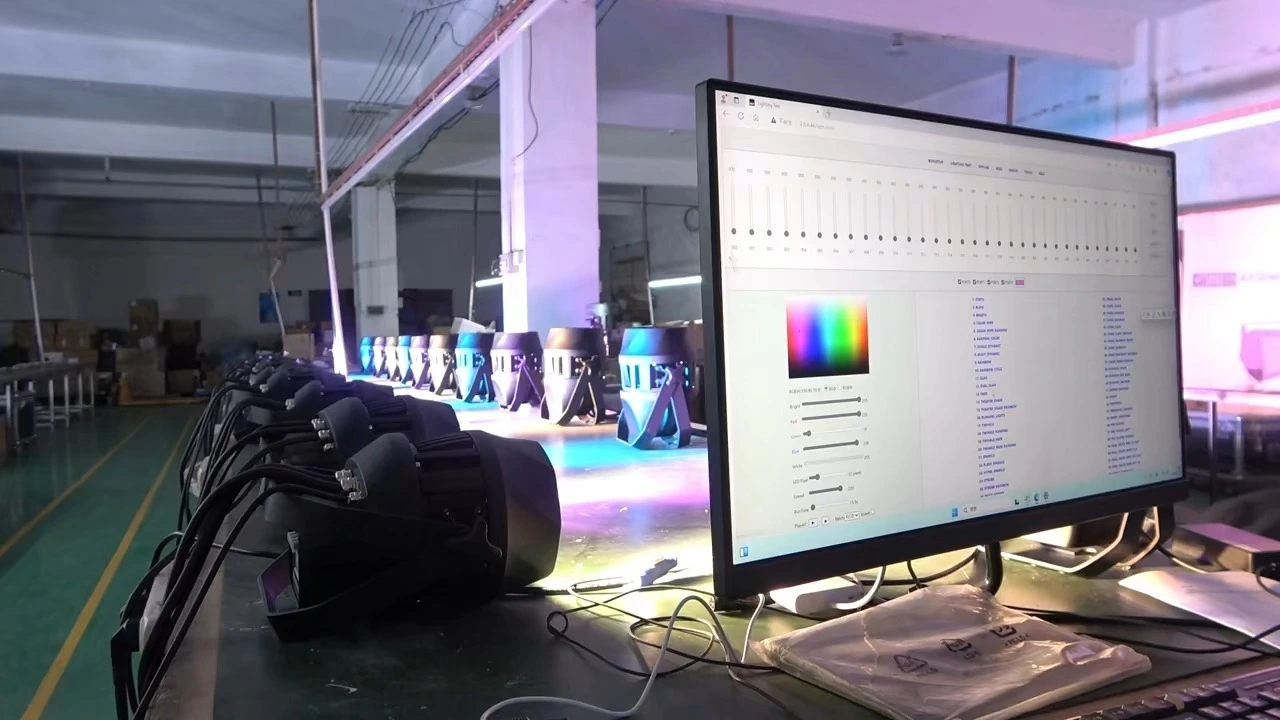
    SL04 DMX Console Stage Light Controller For sweetlight Grandma Magic Q Chromateq DMXCreator ArtNet lumidesk 231:The simple DMX console inside the box can easily detect the quality of the box or lighting fixture.RGB effect player.

    SL04 DMX Console Stage Light Controller For sweetlight Grandma Magic Q Chromateq DMXCreator ArtNet lumidesk 24 2: Webui box setting function, including: MAC, IP network settings, Artnet universe and Name settings, Artnet OEM settings (can simulate equipment from other manufacturers), Function module settings and so on.

    SL04 DMX Console Stage Light Controller For sweetlight Grandma Magic Q Chromateq DMXCreator ArtNet lumidesk 25 3: Playlist editor that supports drag-and-drop, Offline Catcher & Player (supports different attribute sorting function and Chinese file name).   

    SL04 DMX Console Stage Light Controller For sweetlight Grandma Magic Q Chromateq DMXCreator ArtNet lumidesk 26 4: Support RDM function, RDM function includes: find and display all the details of the lighting fixture, modify the lighting fixture address, modify the lighting fixture mode, identify the device, mute device, modify the device label (support Chinese) and so on, the RDM table can be sorted by different attributes, can also be downloaded to the local, saved as an excel file, printed out, convenient for the gaffer to consult.

    Note: This function requires the lighting fixture to have RDM function, and some functions also need the lighting fixture to have this function, most of the lighting fixture only support a few commonly used RDM commands, such as search, mute, identify, modify the address and modify the mode of the function, do not have other additional functions.

    SL04 DMX Console Stage Light Controller For sweetlight Grandma Magic Q Chromateq DMXCreator ArtNet lumidesk 27 5: DMXin and DMX hook, DMX route function, this function can capture the DMX512 signal of the physical console and the DMX512 data on the network, you can clone the light show of the physical console, you can also hook the physical console through the routing function, each channel displays the changed value in real time through different colors, which can be used as a dmx512 detector.  

    SL04 DMX Console Stage Light Controller For sweetlight Grandma Magic Q Chromateq DMXCreator ArtNet lumidesk 28 6: Detailed secondary development documents and TOOLS functions. 

    SL04 DMX Console Stage Light Controller For sweetlight Grandma Magic Q Chromateq DMXCreator ArtNet lumidesk 29 7:Help

    SL04 DMX Console Stage Light Controller For sweetlight Grandma Magic Q Chromateq DMXCreator ArtNet lumidesk 30 Note: Many browsers will automatically add s to http when entering http browsing, and it will become https encrypted connection, please note that you can't add s, the box is a normal connection, and there is no SSL certificate in it. If the first time you browse the box IP, The web page has not been opened within 10 seconds, Basically, it is added s,You can press enter a few more times, The browser will reset the 443 port of the https encrypted connection, The browser will be changed to 80 Port, You can open it in seconds later.

    Tips: Many features may need to be understood by watching our video (please continue to pay attention to the website video updates).

    How to use the new controller.


    1:connect the controller to computer by Type C cable and set the controller IP address firstly.

    2: open the controller web page 2.0.0.44 and activate the controller. 

    3: you can test the simple control function.

    4: if you need more software and you can download from the web link we send you inside the u disk.

    微信图片_20251223110118
    微信图片_20251223110118
    微信图片_20251223110122
    微信图片_20251223110122
    微信图片_20251223110126
    微信图片_20251223110126
    微信图片_20251223110129
    微信图片_20251223110129
    微信图片_20251223110136
    微信图片_20251223110136
    微信图片_20251223110140
    微信图片_20251223110140
    微信图片_20251223110144
    微信图片_20251223110144
    微信图片_20251223110148
    微信图片_20251223110148
    Ready to work with us?

    Feel Free To Contact Us

    Take a look around our website. If you have a query or you need advice, just contact us. We'll take time to help you.
     Provide stage lighting solutions
     Provide entertainment lighting solutions
     Provide professional lighting solutions
     Provide landscape lighting solutions
    Related Products
    no data
    Contact us
    wechat
    whatsapp
    Contact customer service
    Contact us
    wechat
    whatsapp
    cancel
    Customer service
    detect